Wyze v3.0 RTSP / RTSPS

I see that the new FW (v4.36.16.5654) offers native RTSP Support. Anyone have a working setup w/ Security Spy?
Comments
-
I should add, that I've tried using both the Wyze With RTSP Firmware Profile, and a manual profile - and I keep seeing a Connection Closed/Stream Ended
-
Did you get anywhere with this? I'm getting the same. Not entire sure I'm entering all of the settings properly either.
-
@Ben Do you have any insight regarding this? Is there a way to request the testing of or to assist with the testing of a particular camera implementation? Wyze has officially enabled RTSP(S) support for their v3 cameras and are reportedly doing so for their v4 and other "most current" models.
I've been a SecuritySpy user for over two decades now (2005!) with older IP cameras and I'd really like to see if I could move from Wyze Cloud to SecuritySpy over RTSPS.
Thanks
-
I have a couple of older Wyze cameras working with SecuritySpy, but I haven't tried my newer V3 yet since I don't have enough SS licenses for it. Having said that, I am curious if this will work too. @brian163 or @wolfman have you tried a different software package to see if you can view the camera RSTP stream? That way you can see if the problem is on the Camera side or SecuritySpy side. Supposedly VLC can be used and there are some other apps in the App Store. I haven't tried them myself though.
Update: I downloaded VLC from https://www.videolan.org/vlc/, installed it and ran it. I then selected File | Open Network. I put my RSTP url in there and opened it. I was able to view my V2 camera that way. You can find your RSTP url from the Wyze app. It should look something like this: rtsp://wcamview1:yourpassword@192.168.123.33/live where "wcamview1" is the username and "yourpassword" is the password for the camera.
-
I don't believe VLC supports RTSPS. And I don't want to create unnecessary risk by disabling the secure protocol setup that Wyze is actually pushing as the default.
I'm not aware of a free app that supports this but I've been renewing my SecuritySpy support for years so I was hoping to at least get a workable test going. But my license is expiring tomorrow so I'll likely abandon the idea.
-
We don't have a Wyze camera here to test with unfortunately so I can't give a definitive answer, but based on the URL supplied above, this is consistent with the Wyze profile that is already built into SecuritySpy. When using the Wyze profile setting in SecuritySpy, and the correct user/pass and IP address, what exactly are the errors that you see in SecuritySpy's log (File menu > Open Log)?
The Wyze documentation is confusing however, and the documentation for the recent beta shows a URL in the form rtsp://address:port/stream0 rather than rtsp://address:port/live - therefore, try the Manual Configuration profile in SecuritySpy with "stream0" entered as the "Manual profile path".
It also seems to be the case that the recent beta firmware has been officially withdrawn, which indicates it's not fit for market yet.
If you see any errors related to video decoding, try enabling the menu option at SecuritySpy > Debug > Use FFmpeg For Video Decoding, then quit and reopen SecuritySpy. I believe that FFmpeg is what VLC uses by default for video decoding.
The URL posted by @chadchr shows plain RTSP, but @brian163 is mentioning RTSPS. SecuritySpy supports both, but for RTSPS, make sure to enable the "Use SSL for RTSP" option in SecuritySpy, and make sure if there is a custom port in the URL supplied by the camera that this is provided to SecuritySpy in the "RTSP port" box.
-
@Ben Apologies for the delay in response, I appreciate your suggestions.
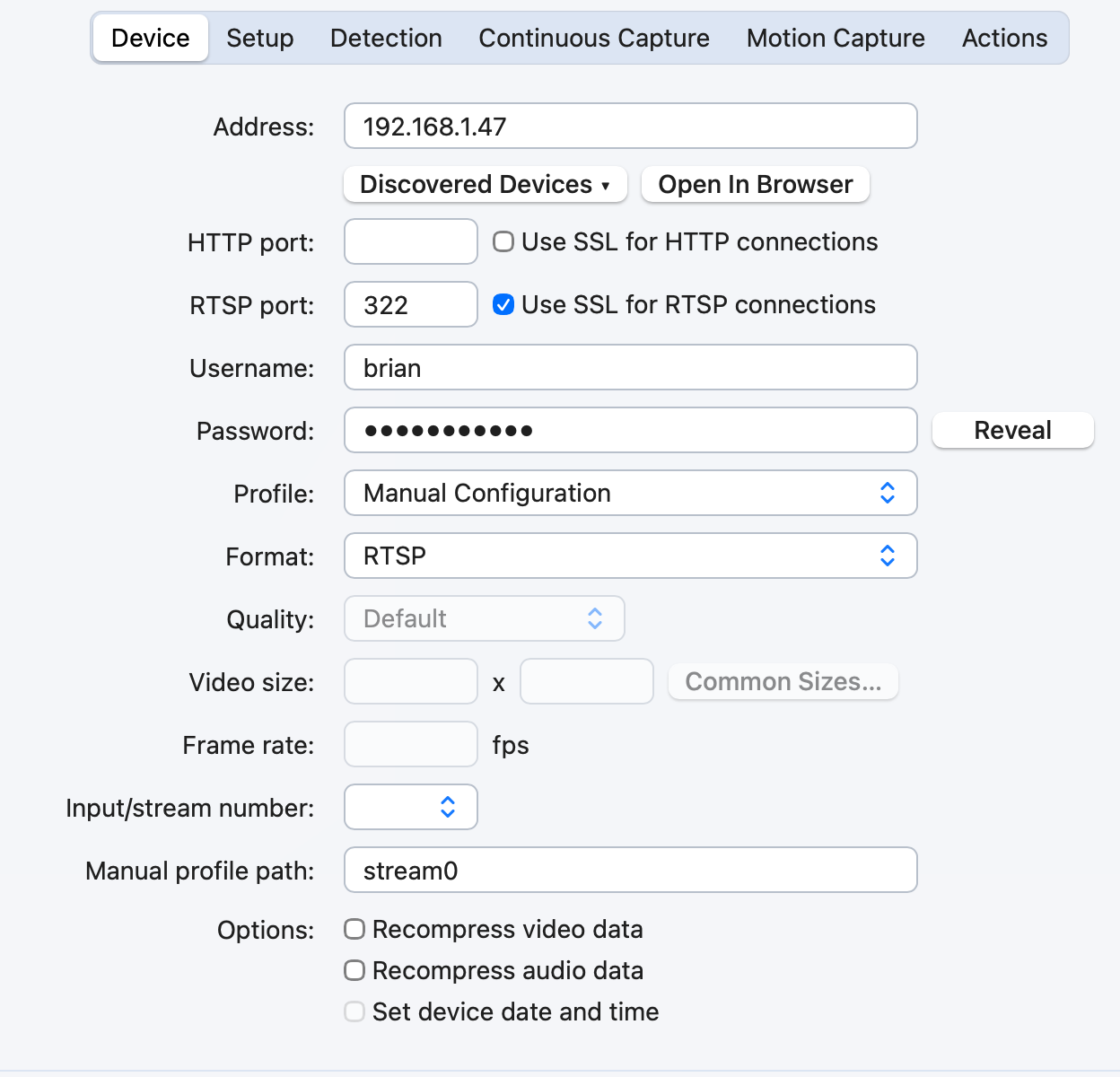
I was able to get an RTSPS connection to a v3 cam on release firmware. (v4 release firmware with RTSPS support is still underway).
Here is my basic configuration example, in the event this may assist others. This is obviously using the Manual Configuration profile option, I did not tinker further with the Wyze profile or any other settings as of yet. But this at least confirms that RTSPS connectivity is possible using SecuritySpy and now released state firmware (as opposed to the older beta and former "special build" Wyze firmware).
Brian
-
This is wild news. I’m going to have to try this new firmware out. I’ve been experimenting with thingino on these cams for a few months now and I’d like to see how the new firmware stacks up.


