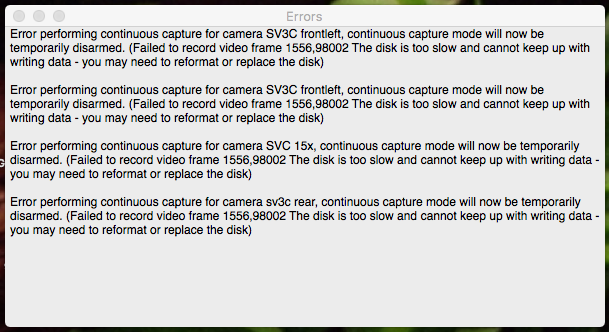
Since updating to 6.20 I keep finding messages that my disk is too slow

I can't find any evidence of problems with the disk. It's a 2 TB SSD connected via external USB3 that runs between 1/2 and 3/4 full.
The messages suggest that recording has stopped but as near as I can tell it picked right up again.

Is this a new problem I need to be worried about, or just something different in 6.2? I really don't need to know if recording paused momentarily for a few seconds while I was asleep (although there's actually no useful indication of when it happened.)
Comments
-
This is not a known/new problem - in fact 6.20 should be significantly more efficient in terms of disk access than 6.19, so this problem should be less likely, not more. This could indicate a problem with your recording disk, but it's not possible to confidently diagnose without further information.
After this happens, SecuritySpy will back off for a short time and then try recording again, so this recovery mechanism sounds like it's working, but still this is a problem that needs to be fixed in order to avoid interruptions in recordings.
My advice would be:
- Revert to the previous 6.19 version to check whether this is in fact a new problem in 6.20. You can do this at Settings > License > Choose Version > 6.19 > Install. If you see the same problem with 6.19, this points to the disk as the culprit.
- After running the above test, email us and include a debug file (SecuritySpy menu > Debug > Create Debug File On Desktop), and we will investigate. Further troubleshooting of this issue should be done via direct correspondence rather than via this forum.
-
Thanks, Ben. Back to 6.19.
-
No messages in SS 6.19.
-
Ran 6.21 update. Got message. Going back to 6.19 again.
-
To get to the bottom of this we will need to investigate and this is best done directly with you by email rather than this forum. Please email us and include two debug files (SecuritySpy menu > Debug > Create Debug File On Desktop); one created by 6.19 and the other created by 6.21 when this problem is showing. Include "escalate to human" at the top of your email so that it bypasses our helpdesk bot and goes straight to our human team.
-
We are also experiencing similar messages since upgrading. I am unable to Revert to the previous 6.19 version, the error 516 File already exist. Is there somewhere I can download the older version ?
Happy provide the debug files.
-
You can download SecuritySpy 6.19 here. Before you revert, please generate a debug file. Then, run 6.19 for a day or so, to test whether you see the errors with 6.19 (this tests whether there is actually a different between versions, or if the timing of the errors started was merely coincidental with the update, which is something that happens often). Then please email us with this information and the debug file so that we can investigate.
-
Thanks, I'll be back in touch in a couple of days.
-
Would be great if this error message could contain some useful info, like what time it occurred.
Thought I'd already confirmed that it happens in 6.20 and 6.21 but reverting to 6.19 is a fix-- really surprised at the suggestion that the timing might just be coincidental.
-
Hi @nealk if you go to File > Open Log you can see the full log, which includes timings of the errors.
In terms of the timing/coincidence thing - this is a very common occurrence after updates. A user has a problem, blames the update (understandably), but it turns out to be something else.
In your case the signal seems much stronger than this that you are having a problem with these specific versions, but you are the only one out of many thousands of users (except maybe @swift_bk now), and on the other hand I know that version 6.20 has actually fixed this issue for other users. This is why I have been asking for debug files from you, in the hopes that I can find out exactly what is happening with your specific system that may be interacting with our software changes in 6.20/6.21 to cause this problem for you (BTW when you email, include the line "escalate to human" at the top so it bypasses our firstline support bot. Please include one debug file from 6.19 and another from 6.21).

